
Stop EQing Vocals Blindly. Fix What You Actually Hear.
Most beginners open an EQ and start turning knobs. They add boosts, cut frequencies, and wonder why the vocal still doesn’t sound right. Here's the truth: EQ without a reason does more damage than good.
The better approach? Listen first. Identify the problem. Then fix only that.
This guide is built around exactly that idea. You'll learn how to spot what's wrong with your voice, and how to fix it step by step, problem by problem.
EQ Should Solve a Problem — Not Create One
EQ stands for equalization. It's a tool that boosts or cuts specific frequencies in your audio. But it's not a polish you spray on at the end.
Think of it like this: if your car has a flat tire, you don't repaint it. You fix the tire. EQ works the same way.
The goal isn't to EQ everything. The goal is to fix what's actually wrong. A muddy vocal needs mud removed. A harsh vocal needs the harshness tamed. A dull vocal needs brightness added. If none of those problems exist, you may not need EQ at all.
"There is no one-size-fits-all solution for how to shape a vocal with EQ."
— iZotope, audio production software & learning resource
Every voice is different. Every recording is different. When you EQ to fix a real problem, the result sounds better. And more importantly, you understand why. That is how you actually improve.
What Problems Will You Actually Face?
Before touching anything, you need to know what to listen for. Here are the most common vocal issues and what they sound like.
Problem 01: Muddy or boomy
The vocal feels thick and unclear. It lacks definition and sits low in the mix. Low-mid frequencies between 200-500Hz are piling up.
Problem 02: Nasal or honky
The vocal sounds like someone talking through their nose. There's an uncomfortable buildup somewhere between 500 Hz and 1.2 kHz.
Problem 03: Harsh or grating
The vocals are tiring to listen to at any volume. The high-mid range, around 2–5 kHz, is too aggressive.
Problem 04: Dull or flat
The vocal feels buried. It doesn't sparkle. The frequencies above 10 kHz, which pros call "air," are missing.
Problem 04: Dull or flat
The vocal has no body. The warmth in the 100–300 Hz range isn't there.
These are not random issues. These are the kinds of problems professionals regularly listen for in vocal sessions. Once you can name what you hear, you can fix it.
EQing Vocals Step by Step
Each step below addresses a specific issue. If the problem doesn't apply to you, skip that step. There's no need to touch what isn't broken.
You can follow along using Remasterify’s EQ settings as you move through each fix
1: Listen Before You Touch Anything
Play the raw vocal without EQing vocals or adding effects to it, and simply listen.
Ask yourself: what's bothering me? Is it too thick? Too sharp? Too flat? Write it down if needed. Even "sounds weird in the middle" is a useful starting point. The goal is to name the problem before you solve it.
2: Cut the Low-End Rumble
Tip: Use subtractive EQ before additive EQ. First, cut the frequencies that are causing problems. Once the vocal sounds cleaner, use gentle boosts to add clarity, presence, or air where needed.
Fix: Muddy or boomy vocals
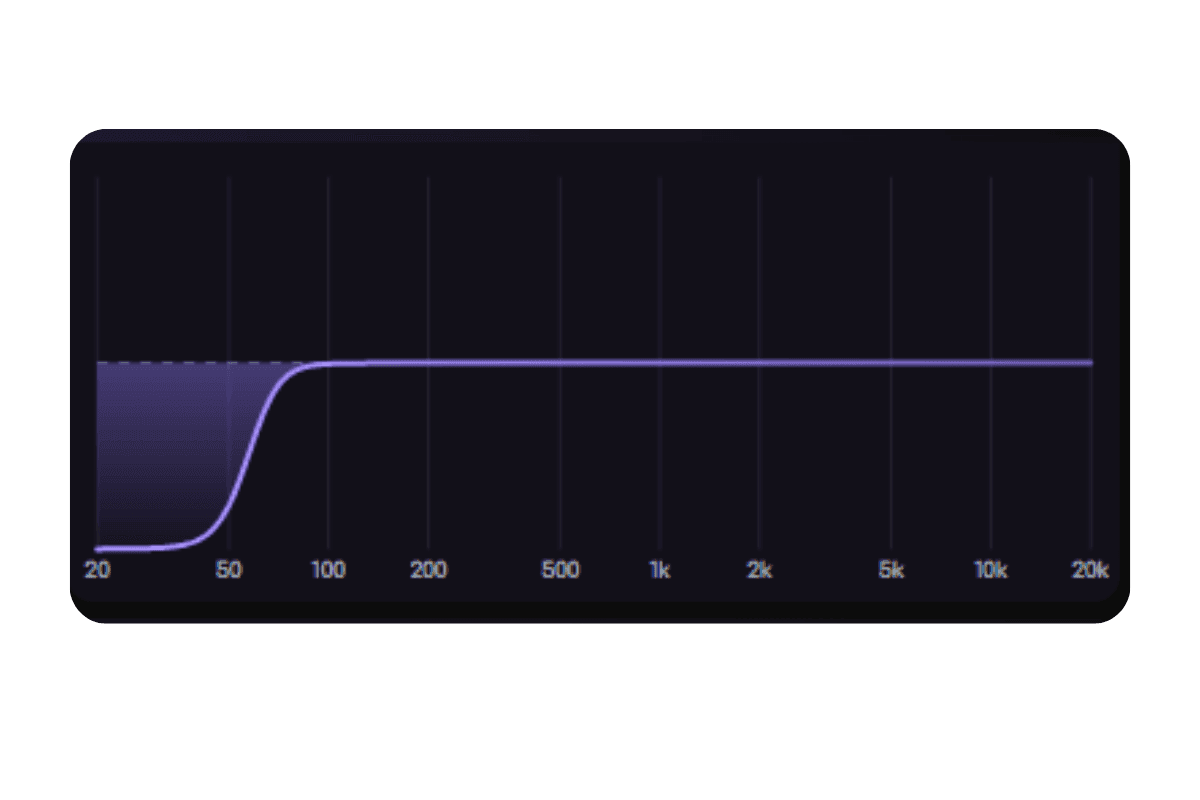
Apply a high-pass filter starting around 100 Hz. This removes everything below that point: mic noise, room rumble, and handling vibrations. Much of that low-end rumble usually does not add useful vocal tone, and removing it immediately makes the vocal feel cleaner and more focused in the mix.
3: Remove the Mud
Fix: Still muddy after Step 2
Muddiness usually hides between 200–500 Hz. To find it, use this technique: create a narrow boost, sweep it slowly across that range, and stop when the vocal sounds most clouded. Then switch the boost to a cut around 2–3 dB, and the clarity returns.
Be careful not to overdo it. Cutting too much in this range makes the vocal sound hollow and thin.
4: Fix the Nasal Tone
Fix: Honky or nasal vocals
This problem lives between 500 Hz and 1.2 kHz. Use the same sweep method from Step 3. Boost slightly, sweep slowly, find the nasal peak, then cut it gently. A 2–4 dB cut is usually all it takes.
This is one of the most satisfying fixes while EQing vocals. The vocal suddenly sounds open and natural instead of pinched and tight.
5: Tame the Harshness
Fix: Harsh or grating vocals
If the vocal causes ear fatigue, something between 2–5 kHz is too loud. This range adds presence and clarity but too much of it becomes painful to listen to.
Make a small, narrow cut around 3–4 kHz. The vocal should still cut through the mix. It just shouldn't hurt.
6: Add Presence
Fix: Dull vocal that doesn't cut through
If the vocal feels buried in the mix, a gentle boost at 3–5 kHz helps it stand out. This range carries consonants, for example, sounds like "t," "s," "k" — which are key to vocal clarity.
Start at 1-2 dB and increase slowly. The vocal should feel more present, not sharper.
7: Bring in the Air
Fix: Flat or lifeless vocals
If your vocal sounds flat when compared to a professional reference track, it likely needs "air." Apply a high shelf boost starting above 10 kHz. This adds shimmer and openness without adding harshness.
Start at 1 dB and increase slowly until the vocal feels more present without becoming sharper.
Recommended Tool
One Tool to Handle All of This
Most beginners don’t struggle because they need more plugins. They struggle because they are not always sure what to fix first, what to leave alone, or why they are making a certain EQ move.

Remasterify gives you both options. You can use custom EQ when you want to make your own cuts and boosts, or use its AI-based EQ, which analyzes the audio and applies settings based on what the track needs. That makes it easier to move with a clear purpose instead of guessing.
From there, Remasterify also helps polish the vocal further with cleanup, loudness control, stereo shaping, and overall mastering support. So once the vocal is balanced, you can make it cleaner, fuller, and more release-ready without breaking your workflow. It keeps the process focused on what actually matters: fixing the problem you heard and helping the vocal sound finished.
Your Vocal EQ Checklist
Run through this before you call any vocal finished.
- Did you listen to the raw recording before EQing vocals?
- Did you list down the problems in your vocal recording?
- Is the low-end clean? (High-pass filter applied at around 100 Hz)
- Is muddiness addressed? (200–500 Hz checked and cut if needed)
- Does it sound natural, not nasal? (500 Hz–1.2 kHz managed if needed)
- Is harshness under control? (2–5 kHz tamed if aggressive)
- Does the vocal cut through the mix? (3–5 kHz presence added if dull)
- Does it have air and openness? (10 kHz+ boosted if flat)
- Did you A/B compare with the unprocessed version before finishing?
EQ isn't about making every vocal sound the same. It's about making your vocal sound like the best version of itself. Fix the problems you hear. Leave everything else alone. That's the whole game.
Ready to Fix Your Vocal Sound?
Use Remasterify to clean, balance, and polish your vocals in seconds