
You add EQ, compression, and reverb, and the kit still sounds weak or cluttered. More often than not, the problem is not that you need more plugins. It is the order of decisions.
How to Mix Drums That Hit Hard - It's Not Just Your Plugins

Drums are not one sound. They are a collection of separate elements: kick, snare, hi-hats, cymbals, toms, room tone, and overheads. Each one occupies its own frequency space, has its own dynamic behavior, and reacts differently to processing. When they come together in a mix, they can clash, compete, or cancel each other out in ways that are not always obvious.
That is what makes drums uniquely difficult, regardless of how they were made. You are not shaping a single sound; you are balancing a group of related elements and making them feel like one cohesive, intentional kit. The goal throughout: power, clarity, and control.
In this guide, you will learn how to:
- Fix balance and phase before reaching for another plugin
- Shape the kick and snare so the core of the groove feels solid
- Use EQ and compression without flattening the performance
- Control cymbals and overheads so the kit feels wide without becoming harsh
- Glue the drum bus together without making the mix smaller
- Use Remasterify as a faster finishing step once the musical decisions are in place
Fix Balance and Phase Before Touching a Plugin
Build Your Rough Balance First
Before opening a single plugin, use your faders to set a rough balance. Get the kick and snare sitting naturally. Bring in the overheads at a level that supports the kit without taking over. A lot of what sounds like an EQ problem at this stage is just a level problem; fix the balance first.
Why Phase Is Quietly Killing Your Punch
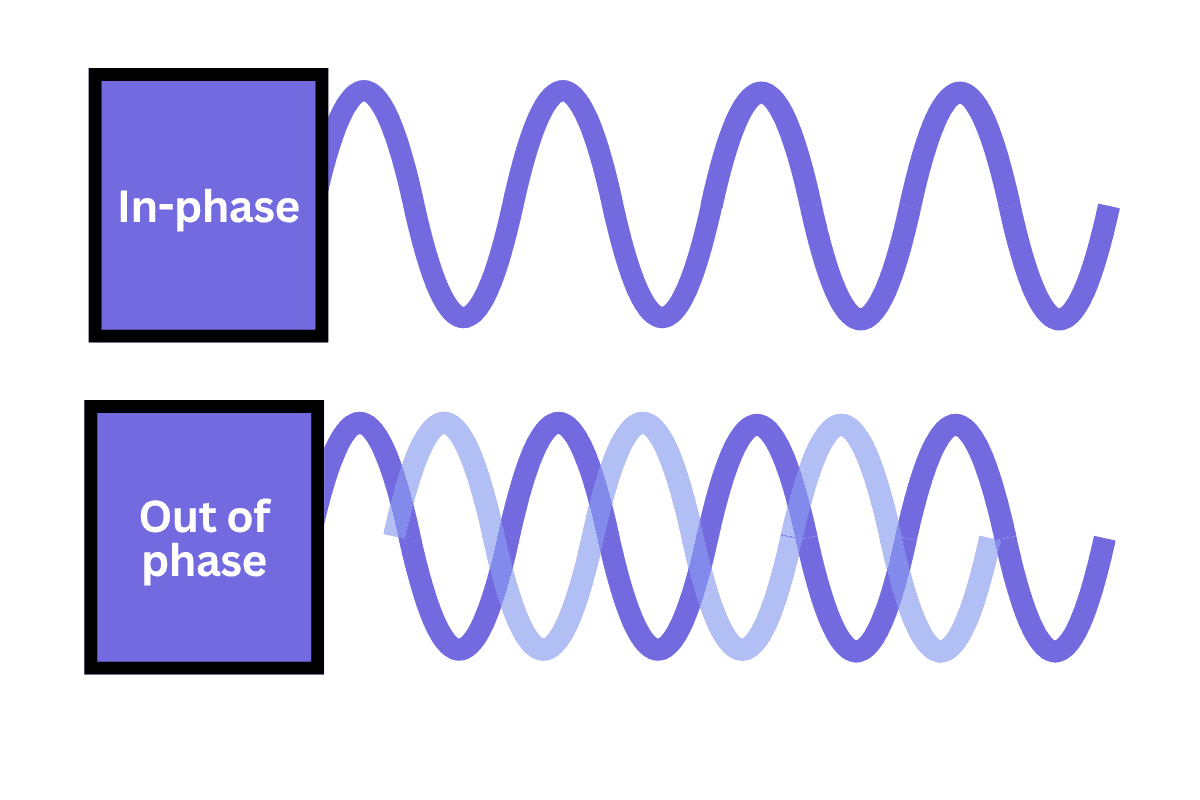
When multiple mics record the same drum at different distances, the sound arrives at each mic at a slightly different time. When those signals combine, certain frequencies cancel each other out, making the kick or snare sound thin and hollow even after heavy processing.
Checking phase alignment between the kick mic and the overheads, or between the snare top and bottom mic, can restore punch and low-end weight that no amount of EQ will recover on its own. It is often the single highest-value fix in a drum mix.
COMMON MISTAKE - Reaching for EQ or compression before checking phase. If the kick sounds hollow after processing, phase cancellation is usually the cause.
Shape the Kick and Snare - The Core of the Mix
The kick and snare carry the listener through the track. If the kick does not move the record and the snare does not make the groove feel alive, the rest of the drum mix becomes decoration.
For the kick, aim for low-end weight, a clear point of attack, and less boxy mid-range buildup. For the snare, aim for body in the low-mids, crack in the upper-mids, and enough top-end presence to cut without becoming brittle.
Use these frequency ranges as starting points, not fixed rules. Drum tuning, genre, mic choice, sample choice, and arrangement will all shift the exact frequency that matters.
Quick EQ Reference
| Element | Frequency | What to do |
|---|---|---|
| Kick - weight | 50-100 Hz | Adds low-end punch and size when the bass relationship allows it. |
| Kick - mud | 200-400 Hz | Cut carefully if the kick feels cardboard-like or cloudy. |
| Kick - beater | 4-6 kHz | Adds click and definition, especially in rock, metal, pop-punk, and dense arrangements. |
| Snare - body | 150-250 Hz | Adds thickness and weight, but can become muddy if overdone. |
| Snare - crack | 2-4 kHz | Adds attack and forward motion; too much can become painful. |
| Snare - air | 2-5 kHz | Tame when cymbals become brittle or fatiguing; dynamic EQ is often smoother than a static cut. |
PRO TIP - In heavier genres, the kick beater click around 4-6 kHz matters more than warmth. In softer styles, weight and roundness take priority. EQ for the genre, not just the solo sound.
EQ and Compression - Use Them with Intention
Cut what is interfering before boosting what is missing
Ask what is getting in the way before deciding what to add. Removing low-end rumble from non-kick tracks, cutting mid-range buildup, and taming cymbal harshness around 2.5 kHz can make the kit sound cleaner before you have done anything creative.
Compress for Punch, Not Flatness
The most common compression mistake is setting the attack too fast, which strips away the transient snap of the drum hit - the thing that makes drums feel powerful in the first place. A slower attack, around 20-40 ms on the kick or snare, lets the initial hit come through before the compressor clamps down. A faster release then lets the gain recover quickly, keeping the groove energetic.
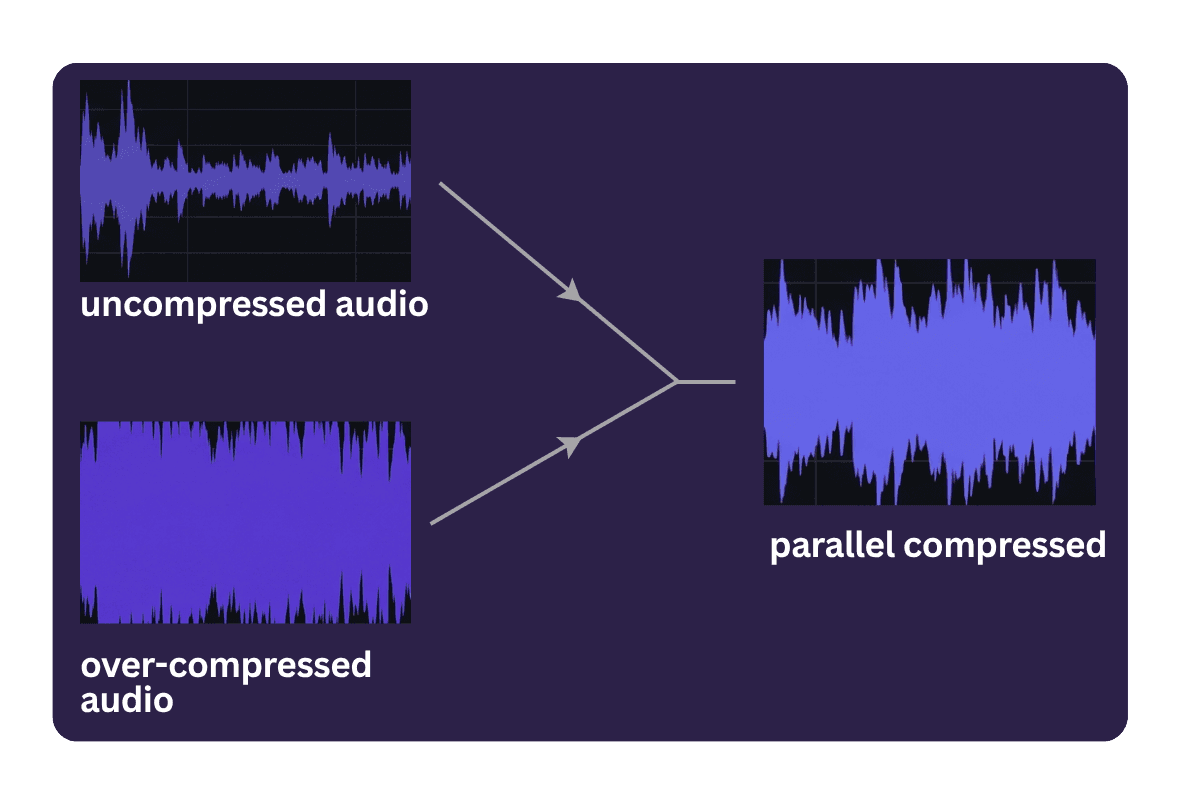
Parallel compression is useful because it adds density without killing dynamics. Think of it as creating an aggressive, heavily compressed version of the drums underneath the dry kit. Blend it in until the drums feel stronger, not louder. Just keep the overhead tracks out of that chain, or loud cymbal hits can cause unpleasant pumping across the whole kit.
COMMON MISTAKE - Over-compressing drums and then wondering why the mix sounds flat. Compression should make drums feel more intentional, not smaller.
Control Cymbals and Overheads
Cymbals are usually the first to expose an amateur drum mix. The harshness tends to cluster around 2-5 kHz, where cymbal overtones become brittle and fatiguing. A dynamic EQ, which cuts only when the harshness actually occurs, is usually more musical than a static notch that removes the same frequencies all the time.
"The cymbals are usually the first thing that makes a drum mix sound amateur — and the last thing most beginners think to fix."
For the overheads, a high-pass filter to remove low-end rumble combined with careful upper-mid management helps them add width and air without washing out the close mics. Too much overhead level is one of the most common reasons a mix feels distant and unfocused.
PRODUCER NOTE - If the cymbals feel exciting in solo but tiring in the full mix, they are probably too exposed in the upper mids. Judge them against the whole kit, not by themselves.
Glue the Kit Together on the Drum Bus
Routing all your drum tracks to a single drum bus is how you move from a collection of tracks to something that sounds like a record. A light bus compressor — slow attack, moderate ratio, and around 2-3 dB of gain reduction — provides glue without squashing the life out of the kit.
A touch of tape saturation on the drum bus adds harmonic warmth and helps the individual tracks feel cohesive. Apply reverb via a send, not directly on tracks, so you can adjust the wet/dry balance without committing permanently. A short plate reverb on the snare, around 0.3-0.8 seconds, adds size without making the mix sound distant.
You will know it is working when you stop hearing individual tracks and start hearing a kit.
Another Effective Method
The manual approach above gives you full control, and for many engineers, that level of hands-on decision-making is exactly the point. But getting there takes time, and once your drum elements are balanced and the overall mix direction is clear, there is a faster way to move toward a finished sound.
Instead of building every stage of the chain manually, you can upload your drum beat, or full mix into Remasterify. It analyses the energy, tonality, and character of the audio, then creates a personalized mastering chain designed to help the drums feel punchier, cleaner, and more controlled.
This works best when the raw balance is already in place. For example, your kick and snare are sitting at the right level, the cymbals are not overpowering the groove, and the beat already feels musically balanced. From there, Remasterify can help you move faster toward a more finished sound without having to manually tweak every processor.
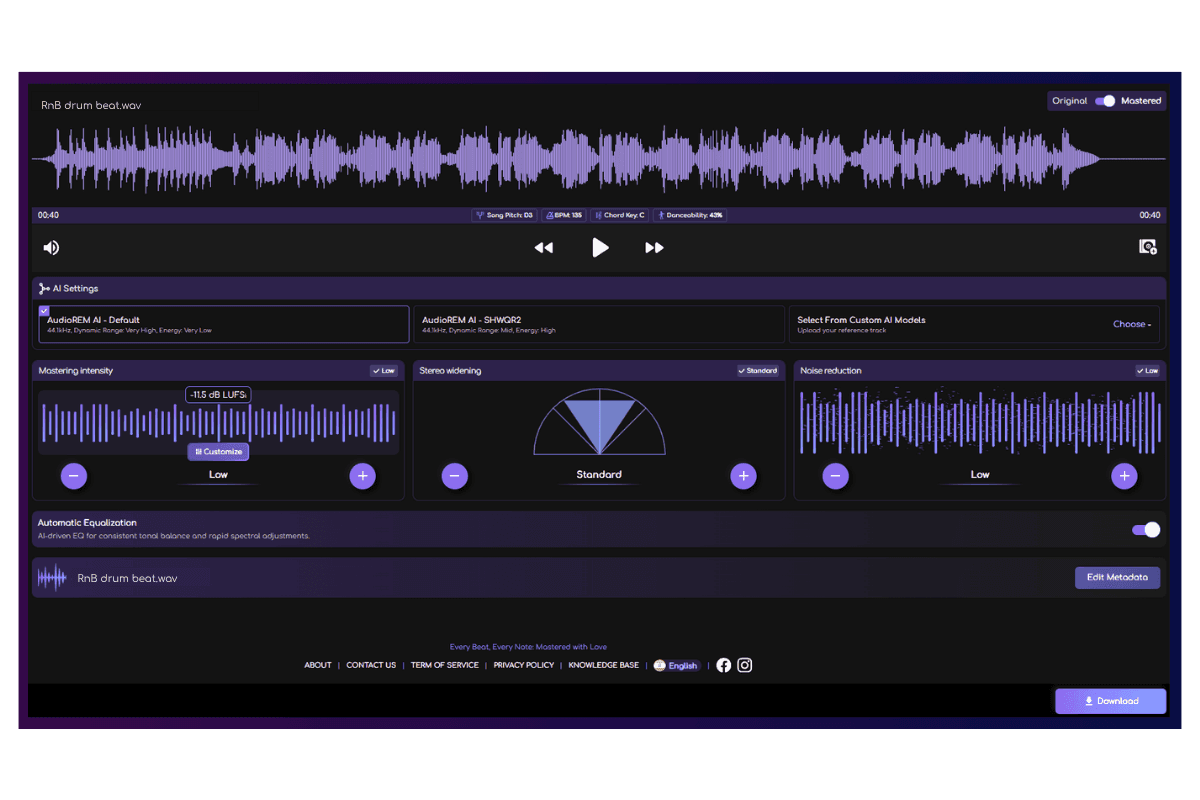
What Remasterify can help you achieve:
- A punchier kick and snare feel without sacrificing dynamics
- A cleaner overall drum tone
- Better control of harshness, mud, and low-end buildup
- A tighter, more mix-ready drum sound
- A faster route from rough balance to polished result
The goal is not to replace listening or arrangement decisions. It is to give you a practical alternative when you have already leveled the drum elements and want a faster way to get the drums sounding powerful, clean, and ready to sit in the track.
Hear the Difference
Everything covered in this guide adds up to this. Hit play on both versions and hear the difference between a drum track that is fighting the mix and one that is working with it.
Original
Mastered
Frequently Asked Questions
What is drum processing?
Drum processing is the use of EQ, compression, saturation, reverb, transient shaping, and bus processing to make drums sound cleaner, punchier, wider, and more controlled. The goal is to make each drum element work together as one cohesive kit.
How to process a kick drum?
Start by balancing the kick against the bass and snare, then check phase if you are using multiple mics or layered samples. Use EQ to add weight around 60-100 Hz, reduce boxiness around 200-400 Hz, and add beater attack around 4-6 kHz. Apply compression carefully so the kick stays controlled without losing its initial hit.
How do I make my drums punchy?
Punchy drums usually come from clean balance, strong transients, and controlled low-end. Check phase first, cut mud instead of only boosting highs, avoid over-compressing, and use parallel compression if you need extra density. The drums should feel stronger, not just louder.
How should you mix drums?
Mix drums by starting with a rough fader balance, then checking phase before adding heavy processing. Shape the kick and snare first, control harsh cymbals and overheads, then use light drum-bus compression or saturation to glue the kit together. Always make final decisions in the full mix, not in solo.