
Set it right, and your track sounds loud, clean, and ready for streaming. Set it wrong and even a great mix can fall apart at the finish line.
Brickwall Limiting: The Final Step in Your Mastering Chain
You finish a song, feel proud of it, and upload it to Spotify. Then you play it next to a commercial track, and your version sounds thin and quiet. Or maybe you turned the volume up yourself, and now it crackles and sounds harsh. Both of these problems usually trace back to the same missing piece at the very end of your mastering chain.
That piece is a brickwall limiter. It decides how loud your final master can get without falling apart. Getting it right is often the difference between a track that sounds amateur and one that holds its own beside professional releases.
What Is a Brickwall Limiter
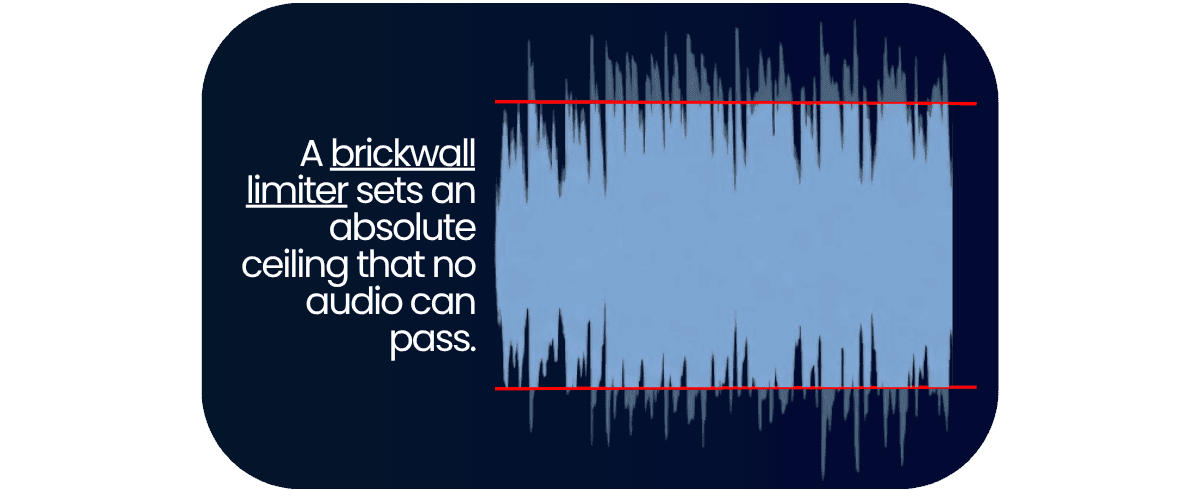
A limiter is a tool that prevents your audio from exceeding a certain volume. A brickwall limiter is the strictest version of that idea. It sets a hard ceiling that your audio simply cannot cross, no matter how hard you push sound into it. Think of it like a low doorway with a solid frame. People can walk through freely, but nobody can stand taller than the frame allows.
This is different from a compressor, which a lot of people confuse with a limiter. A compressor gently turns loud parts down by a set amount, so some signal still pokes through. A brickwall limiter draws a firm line and refuses to let anything past it. In a mastering chain, the brickwall limiter almost always sits last. Everything before it shapes the sound, and the limiter sets the final, safe volume.
Quick definitions:
Ceiling: the highest level your audio is allowed to reach.
Threshold: the level where the limiter starts working.
Gain reduction: how much the limiter is turning your audio down at any moment.
How a Brickwall Limiter Works
Most brickwall limiters share a small set of controls. Once you understand what each one does, the whole tool stops feeling mysterious. Here is what you will actually be adjusting.
| Control | What it does | Good starting point |
|---|---|---|
| Input / Gain | Sets how hard you push audio into the limiter | Raise it slowly until you see a few dB of limiting |
| Threshold | The level where limiting begins | Lower it to drive more signal into the limiter |
| Ceiling / Output | The hard wall your audio cannot cross | Set it to -1 dBTP for streaming |
| Attack | How fast the limiter reacts to a peak | Very fast or fixed on most brickwall limiters |
| Release | How fast the limiter recovers after a peak | Medium, matched to your song's tempo |
Attack on a brickwall limiter is usually very fast or fixed, which is exactly what stops any peak from sneaking over the wall. Release is the control people get wrong most often. Set it too fast, and your music can start to breathe in and out in a way that sounds unsteady. Set it too slow, and the limiter stays clamped down, which can dull your punch. A medium release that roughly matches the tempo of your song is usually a safe place to begin.
True Peak and Your Ceiling
Here is something that surprises many people. Your master can read a safe level on your meter and still distort after you upload it. The reason is something called true peak.
Your audio is stored as a long series of digital snapshots. When a streaming service plays it back, it connects those snapshots into a smooth wave again. Sometimes the rebuilt wave rises higher than any single snapshot showed. Those hidden spikes are called inter-sample peaks, and they can push your audio past zero and cause clipping. Clipping is the harsh, crackly distortion you hear when audio is pushed too far.
This is why engineers set the ceiling a little below the top, usually to -1 dBTP. The "TP" stands for true peak, and that small gap leaves room for the hidden spikes. Spotify itself recommends keeping your true peak below -1 dB for exactly this reason.
The loudest point in your master is often not the one your meter is showing you.
How Loud Is Too Loud
For years, louder masters seemed to win. That is no longer true. Streaming services now use loudness normalization, which means they nudge every track toward a set volume so listeners do not have to keep adjusting the dial. Spotify aims for around -14 LUFS, and Apple Music sits a little quieter at around -16 LUFS. LUFS is simply a way of measuring how loud audio feels to human ears, averaged across the whole song.
So if you crush your master to be as loud as possible, the platform just turns it back down. You lose your punch and your dynamics, and you gain nothing in return. The smarter goal is a master that sounds clean and competitive, not one that is merely the loudest.
Common Brickwall Limiting Mistakes
A few mistakes show up again and again. Most are easy to avoid once you know to watch for them.
- Over-limiting. Pushing too hard flattens your music until it sounds lifeless and tiring. Back off until your master breathes again.
- Causing distortion. Too much gain reduction creates a crunchy, gritty sound. Lower the input until the harshness clears up.
- Using a release that is too fast. This makes the volume pump up and down unevenly. Slow the release down to smooth it out.
- Ignoring true peak. A master that looks safe on the meter can still clip after upload. Set your ceiling to -1 dBTP to stay protected.
- Trying to fix a weak mix with the limiter. This is the big one, and it deserves a closer look.
That final mistake matters more than the rest. If your mix is muddy, harsh, or unbalanced, no amount of limiting will rescue it. Limiting only makes existing problems louder and more obvious. The real fix happens earlier, while you are still mixing. Balance your levels, keep your low end under control, and tame any harsh frequencies before you reach the master stage. A clean mix gives the limiter an easy job, and your final master rewards you for it.
Let Remasterify Handle the Final Step
Getting a brickwall limiter right takes a trained ear and plenty of practice. You are balancing loudness, dynamics, and true peak all at the same time, and small mistakes are easy to miss. The whole purpose of the limiter is to deliver a master that is loud enough to compete, yet clean enough to sound professional on every device.
Remasterify takes care of this part of your mastering chain for you. You upload your finished stereo mix, and its automated mastering chain analyzes the track and applies loudness normalization to streaming targets. It aims for around -14 LUFS with a true peak ceiling of -1 dBTP, so your master arrives loud, competitive, and protected from the hidden clipping we talked about earlier.
It does far more than control your peaks, though. Remasterify also polishes your master with genre-aware analysis, automated and manual EQ, dynamic range control, and stereo width adjustment. You can set the mastering intensity to taste, then export in formats like MP3, WAV, and HD WAV. The result is a release-ready master, without the steep learning curve of doing every step by hand.
Final Thoughts
A brickwall limiter is the last and one of the most important steps in your mastering chain. The key thing to remember is that its job is to protect your music, not just to make it loud. Set a true peak ceiling around -1 dBTP, avoid crushing your dynamics, and start with a clean mix so the limiter has less to fight against. Do that, and your tracks will stand confidently next to the professionals.
Frequently Asked Questions
What does a brickwall limiter do?
A brickwall limiter sets a hard ceiling that your audio cannot pass, no matter how loud the input gets. It catches sudden peaks and keeps your master at a safe, consistent level. This protects your track from clipping and helps it sound both loud and clean.
What is the difference between a limiter and a brickwall limiter?
A regular limiter reduces loud parts, but it can still let a little signal slip past its limit. A brickwall limiter is much stricter and allows nothing to cross the ceiling at all. You can picture a regular limiter as a speed bump and a brickwall limiter as a solid wall.
Is there a difference between a hard limiter and a brickwall limiter?
In everyday use, these two terms describe the same thing. Both refer to a limiter that enforces an absolute ceiling your audio cannot exceed. Engineers tend to use the names interchangeably, so there is no real difference to worry about.
Is the Waves L2 a brickwall limiter?
Yes, the Waves L2 Ultramaximizer is a well-known look-ahead brickwall peak limiter used widely in mastering. It earned its popularity through simple controls and a knack for raising loudness while keeping peaks under control.
Does Remasterify do brickwall limiting?
Remasterify applies loudness normalization and just before downloading your track, you can set your true peak. It brings your master to streaming targets of around -14 LUFS and -1 dBTP. In practice, that handles the peak-control job of a brickwall limiter for you, automatically.