
There is a technique professionals have used for decades to make drums hit harder, vocals sit deeper, and mixes feel alive even after heavy processing. It is called parallel compression, and it changes the way you think about dynamics.
Parallel Compression: How to Add Punch, Weight, and Energy Without Crushing Your Mix
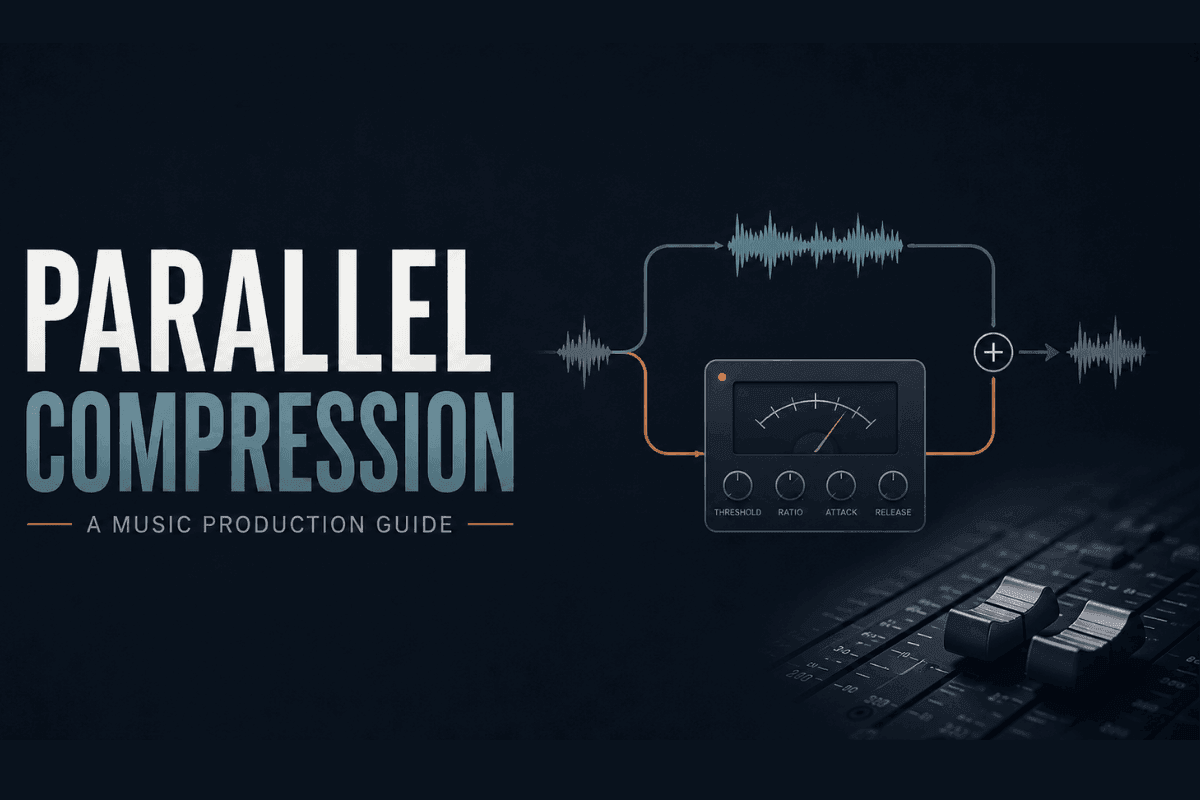
Imagine you have spent hours on a mix. The drums sit right, the bass feels solid, and everything seems to be in place. But when you play it back on a laptop speaker or in the car, the energy starts to fade. The low end thins out, and the punch that was there in the studio just does not carry over.
The natural instinct is to reach for a compressor and push it harder, but that tends to make things worse rather than better. The mix starts to feel flatter and smaller instead of gaining the energy you were after.
Here is why: a compressor works by reducing the loudest parts of a signal. That is useful, but it also flattens the transients, specifically the attack of a drum hit, the pop of a consonant, and the punch that makes a bass feel grounded. Push a compressor hard enough, and those details start to disappear.
“Heavy compression flattens the very things that make a mix feel alive.”
What Is Parallel Compression?
Parallel compression means running two versions of the same signal at the same time: the original dry signal, and a heavily compressed copy. You then blend both together and control how much of each you hear.
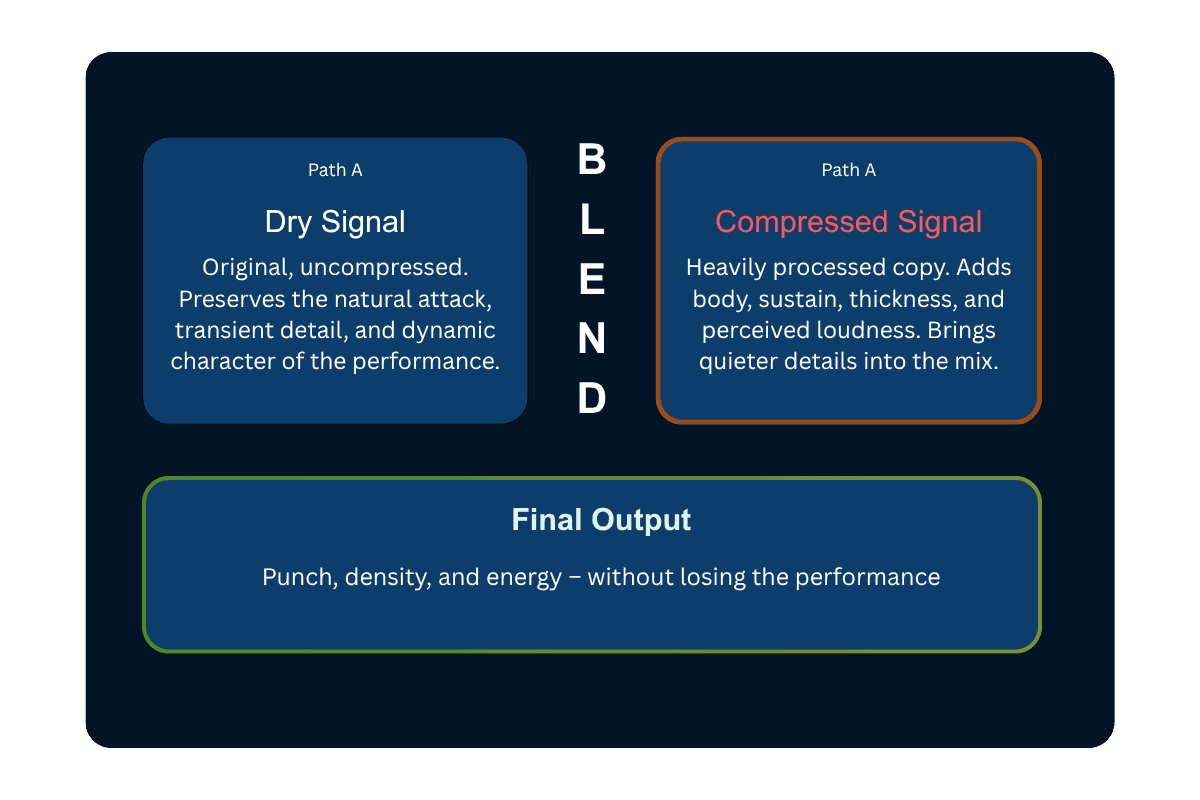
The result is something a single compressor cannot achieve on its own. The loud transients still punch through from the dry track. The compressed version lifts the quieter parts underneath. The mix feels full and controlled, without sounding over-processed.
Historical Note- Parallel compression has been used in professional studios for decades, with early credits often given to engineers at New York recording studios in the 1970s. The technique is sometimes called New York compression, especially in the context of drums. Read More.
Why It Works
Understanding this comes down to what compression actually does to a sound.
When you push a compressor hard, it pulls down the loud peaks, but the subtle details, like the room sound underneath a snare hit, the low-level sustain in a bass note, and the breath before a vocal phrase, get lifted closer to the louder parts. Everything gets closer together in level.
This is useful for control, but when the dry signal disappears entirely into a heavily compressed version, so do the snap, the impact, and the qualities that make the sound feel real.
Parallel compression keeps the dry signal intact and lets you add the compressed texture underneath it. It works similarly to what engineers call upward compression: instead of pushing the loud parts down, you are effectively bringing the quiet parts up. The dynamics become more consistent without flattening the peaks that give music energy.
“You are no longer asking one compressor to do everything at once. That is the real advantage.”
It also gives you more creative control. The shape of the compressed signal, including how fast it attacks and how long it holds, can be dialed in completely separately from the dry signal. You get two different responses happening at the same time.
Where It Shines
Parallel compression is not a one-size-fits-all move. Each source has a slightly different reason for using it.
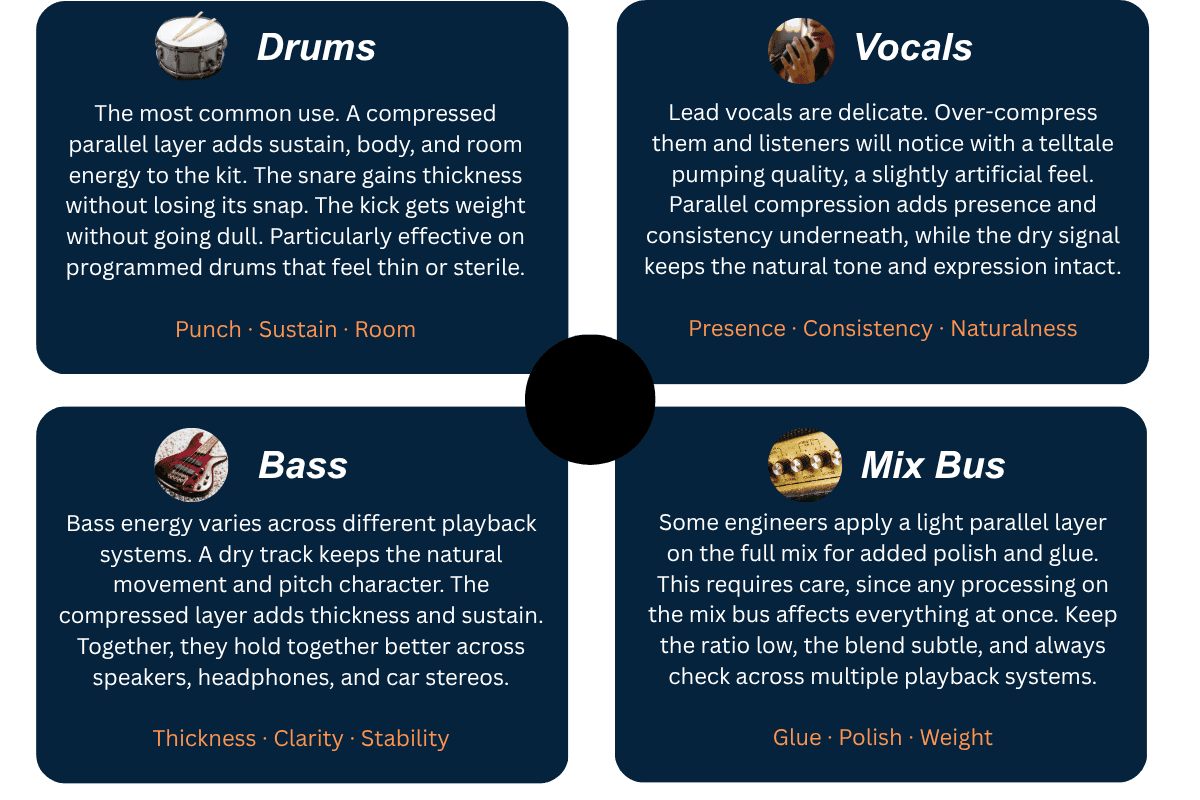
Two Ways to Set It Up
Most modern DAWs make parallel compression easy, either through aux routing, return tracks, or wet/dry controls inside compressor plugins. There are two main ways to work with it, and both have their place.
Method 01
Aux Send / Return Track
The most flexible approach. Preferred by most professional engineers.
- 1. Create a new auxiliary or return channel
- 2. Send the source track or group to it
- 3. Place a compressor on the return channel
- 4. Apply heavy compression — 10:1 or higher, 10 dB+ gain reduction
- 5. Blend the return underneath the dry signal, starting low
Method 02
Compressor Mix Knob
Many modern compressors include a built-in wet/dry mix knob. Faster for individual tracks.
Set the compression as heavy as you want, then dial the wet signal back with the mix knob. No extra routing needed — the blend happens inside the plugin.
Less flexible than a dedicated return channel. Harder to share the compressed layer across multiple sources. But for single tracks, it is the fastest way to work.
Compress Hard. Blend Carefully.
The most important thing to understand: the compressed signal is meant to sound extreme on its own. You are not making it usable; you are making it useful when blended underneath the original.
Goal-Based Settings Reference
| Goal | Suggested Approach |
|---|---|
| More Punch | Medium to slow attack, fast or tempo-matched release. Preserves the transient hit while compressing the body. |
| More Density | Fast attack, higher ratio, heavy gain reduction. Squashes everything to a consistent level — the blend adds mass. |
| More Sustain | Lower threshold, longer release. Holds the tail of the sound up longer — useful for snares and bass notes. |
| More Aggression | Stronger compression plus saturation on the return channel. Adds harmonic character and grit alongside density. |
| More Glue | Lower ratio, moderate attack and release, very subtle blend. Works well on drum buses and mix buses. |
How to Dial in the Blend
- Start with the compressed return very low, barely audible
- Slowly raise it until the mix starts to feel fuller and more energetic.
- If you can clearly identify the parallel layer, it is probably too loud
- Always judge the blend in the full mix, not in solo. What sounds too heavy in solo often disappears in context.
You Do Not Have to Build the Routing to Get the Result
If you are a drummer, a recording musician, or someone just starting out in music production, the techniques in this guide give you the right framework for understanding what punch, weight, and dynamic energy actually mean. The challenge is that getting there through a DAW, setting up the routing, dialing in the compression, and blending the parallel layer correctly, all takes time and practice.
Remasterify gives you a faster way to get there. If you want that same punch and weight that parallel compression delivers, without needing to configure a signal chain to get it, it is worth looking at.
Product Spotlight:Remasterify
You upload your recording or drum track, and Remasterify analyses the audio's energy and characteristics. It then masters the track accordingly, making sure your drums come back with the same hit and punch you are going for, without flattening the dynamic feel that makes a live performance sound alive.
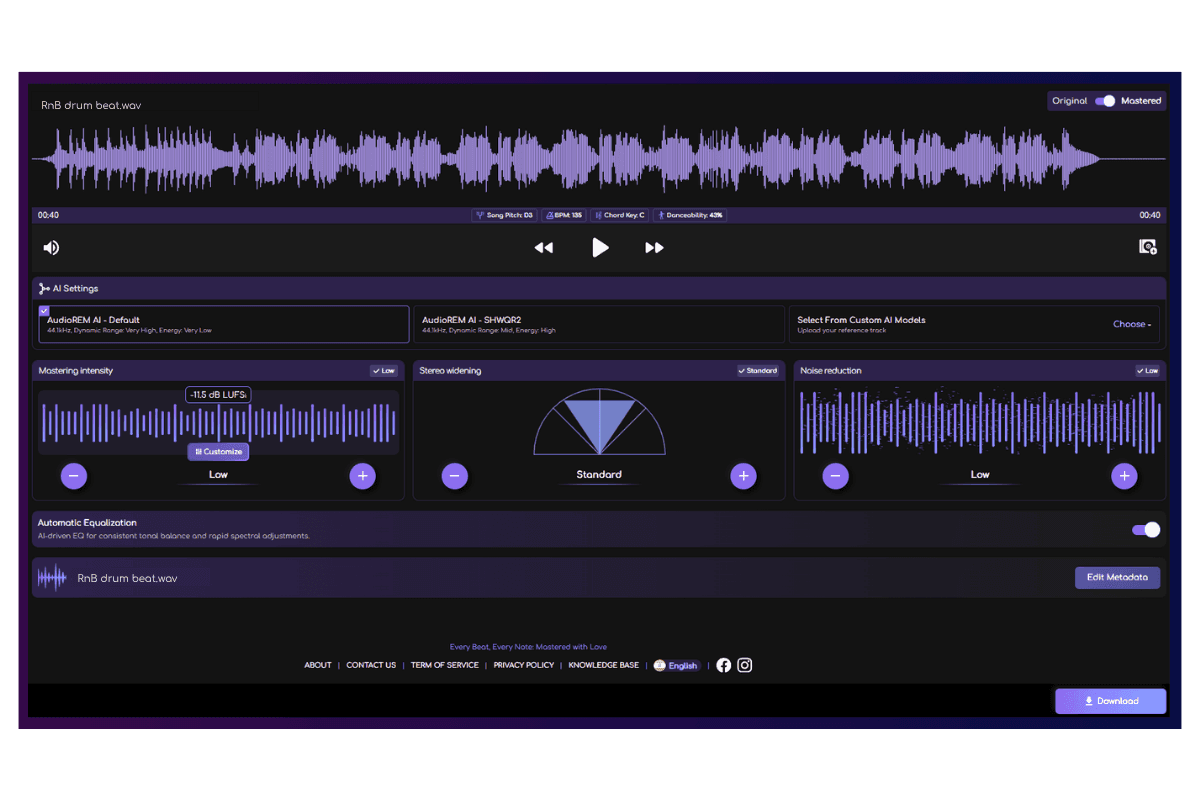
Whether you are a drummer recording at home, a musician working on your first EP, or a producer who wants a faster path to a polished result, Remasterify handles the processing so you can focus on the performance.
The difference is easier to hear than explain.
Original
Mastered
Hear how the right processing can transform a dry track, adding the punch, weight, and energy you would expect from a polished master, without crushing the natural feel.
Common Questions
Is parallel compression only for drums
No. Drums are the most common use case, but the technique works well on vocals, bass, guitars, synths, and even the full mix bus. The principle is the same regardless of the source.
Should I always use parallel compression?
No. Use parallel compression deliberately, when a sound needs more body, sustain, or presence without losing its natural feel. If the track already has good weight, punch, and control, adding a parallel layer may only create unnecessary buildup.
What is the difference between parallel and bus compression?
Bus compression processes a group of tracks directly, shaping their overall dynamics and transients. Parallel compression blends a heavily compressed copy underneath the original, adding density and sustain while keeping the dry signal intact. Many engineers use both: bus compression for glue and parallel compression for extra energy.
What are the benefits of parallel compression?
Parallel compression adds density and sustain without flattening the transients that give a sound its character. The dry signal keeps the natural attack, while the compressed layer adds body underneath, giving you more control than a single compressor alone.

Ready to Hear More Punch, Weight, and Energy in Your Track?
Upload your recording to Remasterify and get back a master that hits harder, sits tighter, and keeps the dynamic feel of your original performance intact.
Master My Track Now